#General Configuration
The middleware configuration is located in the CRM Connector > Settings menu.
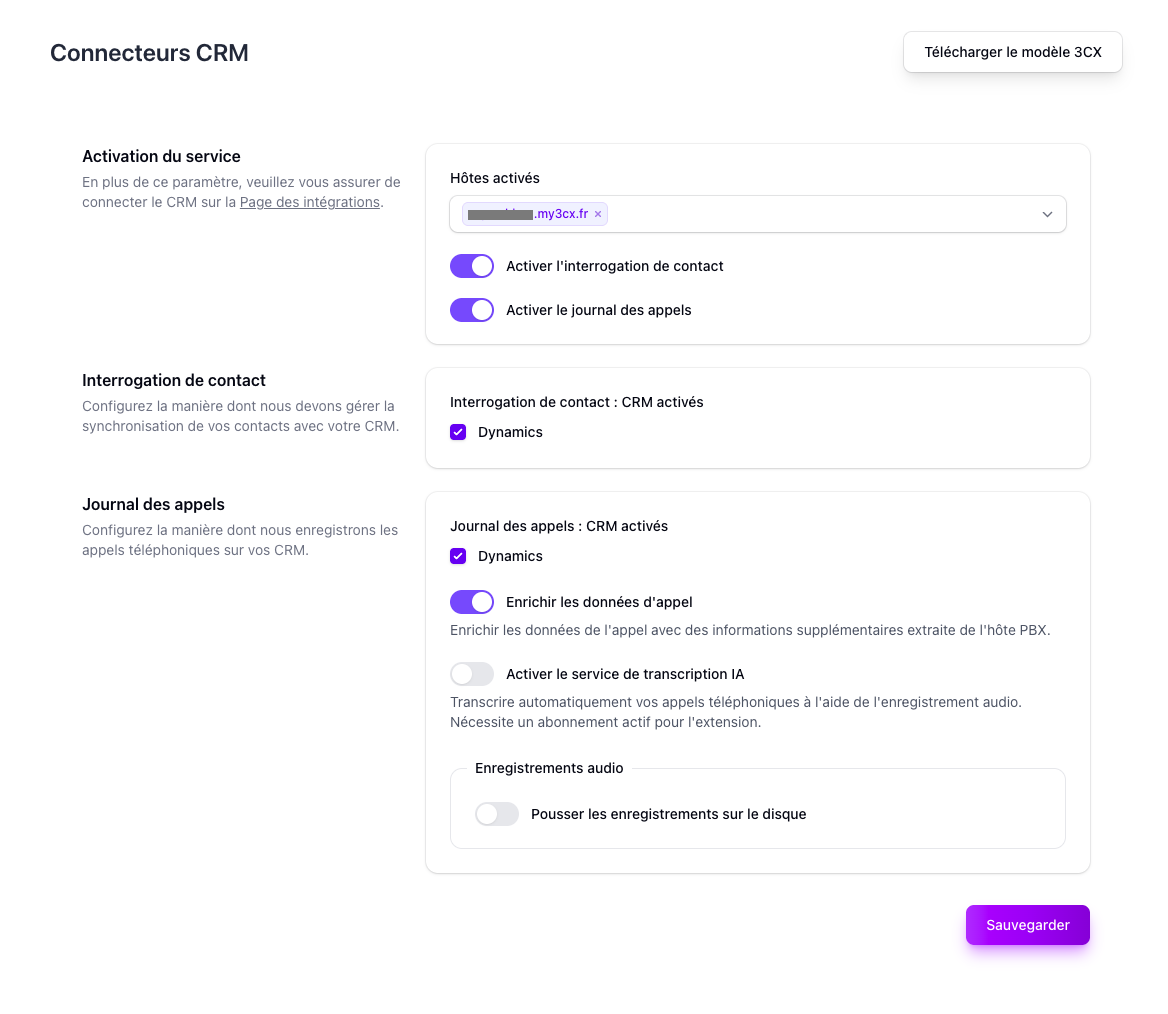
Features are enabled in two steps:
- Enable the feature at the general level — toggle on the desired feature (Contact Lookup, Call Logging, Call Data Enrichment)
- Select the integrations — under each enabled feature, check the integrations you want it to apply to
Available features:
- Contact Lookup — screen pop: identifies the calling contact in your CRM on inbound and outbound calls
- Call Logging — automatically logs calls to your CRM
- Call Data Enrichment — retrieves additional data from the PBX (requires a PBX association): direct line dialed, call segments, audio recordings, etc. Required for AI services.
- 3CX Template — download the 3CX CRM connector template
#Contact Lookup Priority
When contact lookup is enabled for multiple integrations or CRM tables, CX-Engine queries them in the defined order. The first integration to return a match is used; remaining integrations are not queried.
The lookup order is configured per integration in its Configure settings (see Integration-Specific Settings below). Within each integration, you can add and reorder the CRM tables to search.
If no match is found across all configured lookups, the call is processed without contact data.
#Available Fields
CX-Engine exposes a set of predefined fields for each data domain. These fields are used when configuring call logging field mappings, filter rules for Dynamic Contact URLs, and lookup rules.
Fields marked Requires PBX are only populated when call data enrichment is enabled.
#Contact Fields
| Field name | Label | Type | Filterable |
|---|---|---|---|
id |
ID | Text | Yes |
civility |
Civility | Text | Yes |
first_name |
First name | Text | Yes |
last_name |
Last name | Text | Yes |
email |
Text | Yes | |
company |
Company | Text | Yes |
website |
Website | Text | Yes |
phone_business_1 |
Phone business 1 | Text | Yes |
phone_business_2 |
Phone business 2 | Text | Yes |
phone_mobile_1 |
Phone mobile 1 | Text | Yes |
phone_mobile_2 |
Phone mobile 2 | Text | Yes |
custom_value |
Custom value | Text | Yes |
entity_url |
Entity URL | Text | Yes |
#Call Fields
Identifiers
| Field name | Label | Type | Filterable | Requires PBX |
|---|---|---|---|---|
call_id |
Call ID (CX-Engine) | Text | No | No |
segment_id |
Call segment ID (CX-Engine) | Text | No | No |
crm_call_id |
Call ID (CRM) | Text | No | No |
3CX Data
| Field name | Label | Type | Filterable | Requires PBX |
|---|---|---|---|---|
subject |
3CX call subject | Text | No | No |
body |
3CX call body | Text | No | No |
Direction & Status
| Field name | Label | Type | Filterable | Requires PBX |
|---|---|---|---|---|
direction |
Call direction | Text | No | No |
direction_raw |
Call direction (raw) | Text | Yes | No |
description |
Call description | Text | No | No |
status |
Status | Text | No | No |
status_raw |
Status (raw) | Text | Yes | No |
answered |
Answered (textual) | Text | No | No |
answered_boolean |
Answered (boolean) | Boolean | Yes | No |
not_answered_boolean |
Not answered (boolean) | Boolean | No | No |
Phone Numbers
| Field name | Label | Type | Filterable | Requires PBX |
|---|---|---|---|---|
number_from |
Calling number | Text | Yes | No |
number_to |
Called number | Text | Yes | No |
number_contact |
Contact number | Text | Yes | No |
number_did |
DID number | Text | Yes | No |
Duration
| Field name | Label | Type | Filterable | Requires PBX |
|---|---|---|---|---|
duration |
Duration (seconds) | Number | Yes | No |
duration_formatted |
Duration (H:m:s) | Text | No | No |
duration_agent |
Duration with an agent (seconds) | Number | Yes | Yes |
duration_agent_formatted |
Duration with an agent (H:m:s) | Text | No | Yes |
duration_queue |
Duration in queue (seconds) | Number | Yes | Yes |
duration_queue_formatted |
Duration in queue (H:m:s) | Text | No | Yes |
duration_callflow |
Duration in call-flow (seconds) | Number | Yes | Yes |
duration_callflow_formatted |
Duration in call-flow (H:m:s) | Text | No | Yes |
duration_ivr |
Duration in IVR (seconds) | Number | Yes | Yes |
duration_ivr_formatted |
Duration in IVR (H:m:s) | Text | No | Yes |
Timestamps
| Field name | Label | Type | Filterable | Requires PBX |
|---|---|---|---|---|
start_time |
Start time | DateTime | Yes | No |
end_time |
End time | DateTime | Yes | No |
start_time_formatted |
Start time (display) | Text | No | No |
end_time_formatted |
End time (display) | Text | No | No |
start_time_hour |
Start time (time only) | Time | Yes | No |
end_time_hour |
End time (time only) | Time | Yes | No |
Agent
| Field name | Label | Type | Filterable | Requires PBX |
|---|---|---|---|---|
agent_first_name |
Agent first name | Text | Yes | No |
agent_last_name |
Agent last name | Text | Yes | No |
agent_full_name |
Agent full name | Text | Yes | No |
agent_email |
Agent email | Text | Yes | No |
agent_extension |
Answering extension | Number | Yes | No |
agent_extension_array |
Answering extension (array) | Text | No | No |
Extensions (PBX)
| Field name | Label | Type | Filterable | Requires PBX |
|---|---|---|---|---|
extension_agent |
Agent extension | Text | No | Yes |
extension_callqueue |
Call queue extension | Text | No | Yes |
extension_callflow |
Call flow extension | Text | No | Yes |
extension_ivr |
IVR extension | Text | No | Yes |
extension_voicemail |
Voicemail extension | Text | No | Yes |
AI & Transcription
| Field name | Label | Type | Filterable | Requires PBX |
|---|---|---|---|---|
transcription |
Transcription (raw) | Text | No | Yes |
summary |
Summary (short) | Text | No | Yes |
summary_detailed |
Summary (detailed) | Text | No | Yes |
sentiments_label_raw |
Sentiment label (raw) | Text | No | Yes |
sentiments_label |
Sentiment label (display) | Text | No | Yes |
sentiments_score_average |
Sentiment score (average) | Number | No | Yes |
sentiments_nets_score |
Sentiment net score | Number | No | Yes |
sentiments_evolution_raw |
Sentiment evolution (raw) | Text | No | Yes |
sentiments_evolution |
Sentiment evolution (display) | Text | No | Yes |
sentiments_array |
Sentiments (array) | Text | No | Yes |
reason_for_call |
Reason for call | Text | No | Yes |
reason_for_frustration |
Reason for frustration | Text | No | Yes |
topics_string |
Topics (comma-separated) | Text | No | Yes |
topics_array |
Topics (array) | Text | No | Yes |
subjects_string |
Subjects (comma-separated) | Text | No | Yes |
subjects_array |
Subjects (array) | Text | No | Yes |
kpi_fcr |
First call resolution (boolean) | Boolean | No | Yes |
audit_grid |
Audit grid (JSON) | Text | No | Yes |
audit_score |
Audit score | Number | No | Yes |
Recordings
| Field name | Label | Type | Filterable | Requires PBX |
|---|---|---|---|---|
recording_urls |
Recording URLs (array) | Text | No | Yes |
recording_urls_string |
Recording URLs (comma-separated) | Text | No | Yes |
transcript_urls |
Transcript URLs (array) | Text | No | Yes |
transcript_urls_string |
Transcript URLs (comma-separated) | Text | No | Yes |
Segments
| Field name | Label | Type | Filterable | Requires PBX |
|---|---|---|---|---|
segments_formatted |
Segments formatted (array) | Text | No | Yes |
segments_formatted_string |
Segments formatted | Text | Yes | Yes |
User
| Field name | Label | Type | Filterable | Requires PBX |
|---|---|---|---|---|
user.id |
User ID | Text | No | No |
user.email |
User email | Text | No | No |
#Chat Fields
| Field name | Label | Type | Filterable | Requires PBX |
|---|---|---|---|---|
chat_id |
Chat ID (CX-Engine) | Text | No | No |
crm_chat_id |
Chat ID (CRM) | Text | No | No |
subject |
3CX chat subject | Text | No | No |
chat_messages |
Chat messages | Text | No | No |
number_external |
Contact number | Text | Yes | No |
duration |
Duration (seconds) | Number | Yes | No |
duration_formatted |
Duration (H:m:s) | Text | No | No |
start_time |
Start time | DateTime | Yes | No |
end_time |
End time | DateTime | Yes | No |
start_time_formatted |
Start time (display) | Text | No | No |
end_time_formatted |
End time (display) | Text | No | No |
start_time_hour |
Start time (time only) | Time | Yes | No |
end_time_hour |
End time (time only) | Time | Yes | No |
agent_first_name |
Agent first name | Text | Yes | No |
agent_last_name |
Agent last name | Text | Yes | No |
agent_full_name |
Agent full name | Text | Yes | No |
agent_email |
Agent email | Text | Yes | No |
agent_extension |
Answering extension | Number | Yes | No |
agent_extension_array |
Answering extension (array) | Text | No | No |
extension_agent |
Agent extension | Text | No | Yes |
extension_callqueue |
Call queue extension | Text | No | Yes |
user.id |
User ID | Text | No | No |
user.email |
User email | Text | No | No |
#Call Context Token
Call context tokens are used to enrich call-related data before the call ends. For example, you might want to specify that the call refers to a support ticket in your information system. The contexts are customizable and can be retrieved when the call is received in the CRM.
To create a call context token:
- Navigate to the Call Context Tokens section in the CRM Connector settings
- Click New Token
- Enter a descriptive name (e.g., "3CX Production")
- Copy the generated webhook URL to use it
#Dynamic Contact URL
A Dynamic Contact URL is a configurable URL template that CX-Engine resolves when a call comes in, enabling you to open a specific page — a CRM record, an internal tool, etc. — in the agent's browser as a screen pop.
The URL template supports two dynamic placeholders that are replaced at call time:
{phone}— the caller's phone number{display_name}— the caller's display name (as received from the PBX)
#Filter Rules
You can define filter rules so that the URL is only generated when certain conditions are met. Multiple rules can be combined with AND or OR logic. Available filter fields:
| Field | Label | Type |
|---|---|---|
phone |
Phone | Text |
display_name |
Display name | Text |
phone_length |
Phone length | Number |
display_name_length |
Display name length | Number |
#Creating a Dynamic Contact URL
- Navigate to the Dynamic Contact URLs section in the CRM Connector settings
- Click New URL
- Enter a name and the URL template (e.g.,
https://mycrm.com/contacts?phone={phone}) - Optionally add filter rules to restrict when the URL is triggered
- Copy the generated Destination URL and configure it in your 3CX CRM connector as the screen pop URL
When 3CX calls the Destination URL, CX-Engine evaluates the filter rules, substitutes the placeholders, and redirects the browser to the final URL.
#Integration-Specific Settings
To access the specific configuration for a connected integration, go to CRM Connector > Settings and click the Configure button on the integration you want to configure.
Integration-specific settings allow you to:
- Choose the integration variant (e.g. Dynamics 365 Business Central vs Dynamics 365 Sales)
- Configure the CRM table lookup order
- Define custom matching rules between phone fields and CRM fields